

Store Clearpay as a Payment Method
The first step to enable Recurring Payments functionality is to setup consumer approval by calling the billing agreements approval API.
1. Setup Billing Agreement Approval

You will call the Setup Billing Agreement Approval endpoint to give Clearpay information including:
- Customer Information
- The URL you want the customer to go to when they complete the Clearpay approval flow
- Agreement Information
Clearpay responds with a token used to identify this approval flow.
e.g. 003.5lmerr3k945d00c7htvcrdff83q36kp10a247m212fjpa5ju
The token is used with the JavaScript library to direct the customer to the Clearpay approval flow.
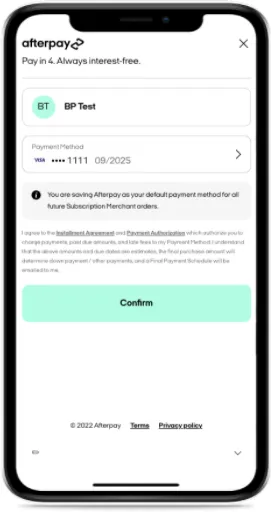
After the customer completes the approval flow, they are returned to the merchant website URL. This is the URL provided in the Setup Billing Agreement request. If the merchant uses the Redirect Method the URL will have the status appended to the Merchant URL. For Example:
- If the customer successfully completes the approval flow:
www.merchant-example.com/confirm?&status=SUCCESS&orderToken=003.5lmerr3k945d00c7htvcrdff83q36kp10a247m212fjpa5ju - If the customer closes the window:
www.merchant-example.com/confirm?&status=CANCELLED&orderToken=003.5lmerr3k945d00c7htvcrdff83q36kp10a247m212fjpa5ju
A Pop-up Method is also available which uses a postMessage to communicate the status and token.
Now that you have the customer’s approval of the billing agreement, you can create the Billing Agreement.
2. Create Billing Agreement
See Create Billing Agreement for more details.

This API creates the billing agreement, and returns a billing agreement token to you. Keep this token for future transactions.