

Disputes Overview
End-to-end Dispute Flow
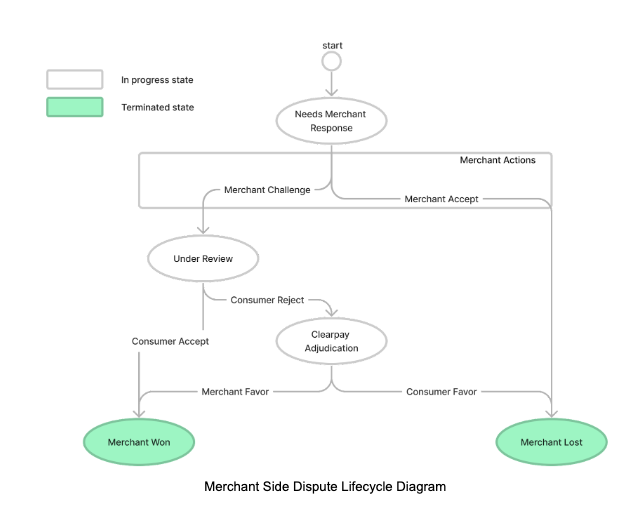
An overview of the end-to-end dispute flow is:
- Clearpay receives a dispute from the customer.
- Clearpay notifies the merchant with a dispute reason code for the dispute.
- The merchant is notified that a dispute is opened.
- The merchant accepts the reason for the dispute and the dispute is over. Or the merchant challenges the reason for the dispute and submits evidence through the API or the UK Business Hub. This response and evidence is sent to the customer for review.
- The customer accepts the merchant is correct and the dispute is over. Or the customer rejects the merchant’s assertion and evidence. The dispute now goes to Clearpay for adjudication.
- Clearpay assesses the evidence and notifies the merchant if the dispute is won or lost.
- Clearpay notifies the customer that the dispute is won or lost.
Merchant Side Dispute Lifecycle Diagram
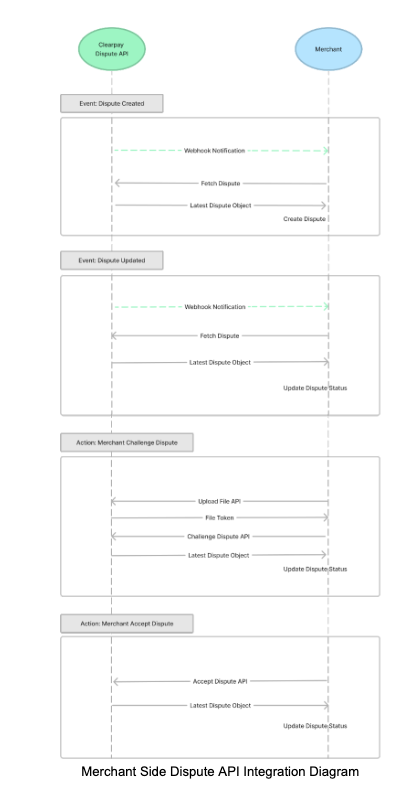
Merchant Side Dispute API Integration Diagram
API Endpoints Overview
This table lists the APIs provided to merchants:
The Clearpay Dispute API uses Basic HTTP Authentication, same as other Clearpay online API endpoints. Merchants can use the same credentials used for other endpoints.
Dispute Notifications
Clearpay notifies merchants using webhooks when a dispute is created and any time it is updated. Clearpay expects the ACK (acknowledgement) with a 200 response. If the acknowledgement fails, Clearpay reattempts sending the webhook a few times with exponential backoff.
The following table outlines the content for the webhook call:
A dispute_id is passed in the webhook call. Merchants can use the Get Dispute endpoint to obtain details of the dispute.
Notification Setup
You, the merchant, must provide a webhook URL and merchant IDs to the Clearpay merchant service/dispute team to get the HMAC key and enable the notification.
Merchants/partners should maintain the webhook endpoint. The endpoint must allow POST requests with content-type = application/json.
Note
The payload format is defined in the previous table.
Notification Authentication
- (option 1) Key Exchange Wiki: Diffie-Hellman Key Exchange via Openssl: Quick Guide
- (option 2) Securely get HMAC key from https://squareup.sendsafely.com/
HMAC Signature
Clearpay recommends that you use HMAC for the authentication of the webhook notification.
Below is the structure of the raw HTTP message:
There are two extra fields for authentication.
X-Afterpay-Request-Daterecords the send time for the webhook request. We recommend aborting the stale notification after a fixed time. For example, if you receive the webhook and current timestamp -${X-Afterpay-Request-Date}after more than 5 minutesX-Afterpay-Request-Signaturerecords the signature of the HMAC key. Typically we use the following steps to generate the signature:
Dispute Decisions and Closures
Dispute Cancellation
You can close canceled disputes (for example, disputes that may have been opened in error and must be retracted) with customer_cancelled as the closing_reason.
Note
All dispute records are saved in the Clearpay System and are accessible through the Dispute APIs. Clearpay never delete any dispute records.
Settlement and Reporting
In financial reporting, there is a separate record for a dispute. Order ID, Dispute ID, financial changes (+/-) are included in this record.
Note
Clearpay only gathers funds from the merchant after the merchant loses the dispute.